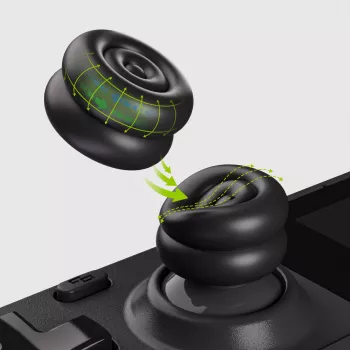
A familiar game can feel a little different when you change what sits under your thumbs. Our Anti-Slip Thumb Grips for Steam Deck LCD & OLED add a raised, cushioned contact surface to the thumbsticks, giving you another way to tailor your handheld setup. For more guidance, see Steam Deck Thumb Grips Cute.
The idea is straightforward: if you prefer a taller or softer surface than the original sticks provide, these caps offer an alternative. They won’t turn every player into a sharper shot, but they may give you a feel you enjoy for aiming, steering, or moving a camera. For further reading, see PlayVital Steam Deck Thumb Grip Caps 10 Styles.
Thumbstick feel is personal. Some players like the direct feel of the original surface, while others prefer a little more height or cushioning. Adding a cap changes where your thumb meets the stick, so movements that feel familiar without a grip may take a little practice with one.
The raised profile is most noticeable when you make small adjustments. You might find that a taller contact point feels useful when lining up a view or guiding a vehicle around a corner. You might also prefer the original stick feel for certain games. Neither response is unusual: comfort and control depend on your hands, your habits, and what you’re playing.
Our team recommends treating the caps as a comfort and control preference rather than a guaranteed performance upgrade. Give yourself time to adjust before deciding whether the new feel works for you.
These grips are made for Steam Deck LCD and OLED models. Their anti-slip design is intended to help your thumbs stay in contact with the sticks, while the height boost and cushioned surface change the feel at the point of contact.
A taller surface may feel different as you aim, steer, or sweep the camera across a scene. The change is physical rather than automatic: it does not alter a game’s settings, and it does not guarantee greater accuracy. For general information about the handheld itself, you can visit the official Steam Deck website.
| Feature | What to consider |
|---|---|
| Anti-slip surface | Designed to help thumbs stay in contact with the sticks. |
| Height boost | Adds a raised surface that may change the feel of stick movement. |
| Cushion caps | Provide a cushioned contact surface for the thumbs. |
| Compatibility | Made for Steam Deck LCD and OLED models. |
Start with a game you know well. Familiar controls make it easier to notice the difference between the original stick surface and the raised caps. Try a few small movements first, such as adjusting your aim or nudging a camera into position. Then spend some time on longer movements, such as steering through a turn or looking around a larger area.
Pay attention to how your thumbs rest when you are not actively moving the sticks. The cushioned surface should feel comfortable to you, without making you strain to reach the controls. Move each stick in every direction, too, and make sure it travels freely with the cap in place.
If your usual settings feel too quick or too slow after the change, in-game sensitivity is an option to explore. Adjust it gradually, then play for a while before making another change. You may find a setting you prefer, or you may decide your original sensitivity still feels best.
Different games can also place different demands on your thumbs. A setting that feels comfortable for a driving game may not be your favorite for precise aiming. Testing the grips across the games you play most often gives you a more useful impression than judging them from a single moment.
Make sure each cap is secure before you start playing, and follow any instructions included with the product. If a cap shifts or interferes with stick movement, stop and reseat it before continuing. Keep the caps clean and check them periodically for wear, especially if you use your handheld often.
Our thumb grips were listed at $9.97 USD and in stock at the time of planning. Visit the product page for current purchase details.
If you’re browsing our store beyond your handheld setup, you can also explore Great Meals, Small Budget. It’s another in-stock selection from our catalog for when you’re ready to take a break from your screen.
Before choosing, compare the product details with your daily routine, available space, care needs, and preferred setup. The strongest option is usually the one that fits the intended use clearly and remains simple to clean, store, and check before repeat use.
Yes. The grips are listed for both Steam Deck LCD and OLED models.
The raised surface changes the feel of the sticks, but improved aim is not guaranteed. Try the grips with familiar games and adjust sensitivity if you wish.
The caps provide a cushioned surface, but comfort varies from person to person. Test the fit and take breaks as needed.





Leave a comment