Mini Projector: 1080P Auto Focus, 4K Input, Android 11
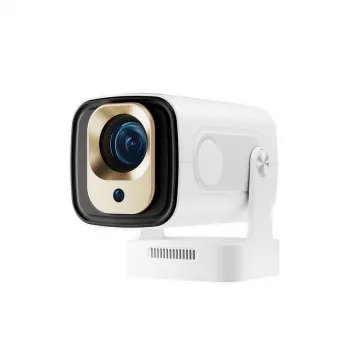
When a big-screen setup needs to fit on a nightstand, dorm desk, or carry-on bag, a mini projector can be the simplest way to turn any blank wall into a movie night. The 1080P Full HD Auto Focus Mini Projector with 4K Support and Android 11 is designed for quick, low-fuss viewing: you get sharp 1080P playback, auto focus that helps you lock clarity fast, 4K input compatibility for modern devices, and Android 11 so you can stream without adding a separate box. Below is a practical look at image quality, setup, connectivity, audio, and who this style of projector fits best.
What this projector is built for
- Quick-start movie nights: auto focus helps deliver a sharp picture without constant manual lens tweaking.
- All-in-one streaming: Android 11 can reduce the need for a separate streaming stick when the apps you use are supported.
- Small rooms and portable setups: a mini form factor works well in bedrooms, dorms, RVs, and travel setups.
- Casual gaming and sports: best paired with low-latency sources and realistic screen sizes for cleaner motion and readability.
Key features that shape the viewing experience
1080P Full HD playback
For typical bedroom or apartment screen sizes, 1080P can look impressively crisp—especially for subtitles, menus, and sharp edges in animated content. It’s also a practical resolution for most streaming services, where true 4K streams may depend on app support, bandwidth, and content rights.
4K support (input compatibility)
“4K support” usually means the projector can accept a 4K signal from a device (like a console or streaming box) and then play it back. Depending on the projector’s native display panel, the final on-screen image may still be 1080P. The real-world benefit is smoother device pairing and fewer “unsupported format” headaches when you plug in newer hardware.
Auto focus
Auto focus is a quality-of-life feature: move the projector forward for a bigger image, shift it to a different shelf, or pack it for a trip, and it can quickly re-establish sharpness. It’s especially helpful when the projector is used in multiple rooms or repositioned often.
Android 11 built in
With Android 11 on board, streaming and casting can feel more like using a smart TV—without adding extra devices. App availability and update behavior vary by manufacturer, so users who rely on specific streaming platforms may still prefer a dedicated stick for maximum compatibility. For reference on the platform itself, see the official Android 11 overview.
Setup basics: placement, focus, and screen sizing
Start centered to keep the image clean
Place the projector as square to the screen as possible, with the lens roughly aligned to the screen’s center. This reduces the need for heavy keystone correction, which can soften detail and make text look slightly uneven at the edges.
Control ambient light for better contrast
Mini projectors generally look best in dim or dark rooms. Curtains, lamp placement, and wall color make a noticeable difference. If the room stays bright, a smaller image often looks punchier than trying to “go huge” and washing out the picture.
Give auto focus an easy target
Pick a realistic screen size
Plan audio based on seating distance
Built-in speakers are convenient for close seating, dorm rooms, or quick setups. For stronger dialogue clarity and fuller sound, consider external audio through available outputs (Bluetooth or wired, depending on your setup). If you’re connecting devices via HDMI, it helps to understand general compatibility from the HDMI specification overview.
Connectivity and content options
If you’re new to choosing a screen surface, viewing distance, or room layout, practical placement tips are available from ProjectorScreen.com’s projector guides.
Quick comparison checklist
| Item | What to check | Why it matters |
|---|---|---|
| Room lighting | Can the room be dimmed with curtains or lights off? | Better contrast and more vivid colors |
| Projection surface | Screen, smooth wall, or portable screen available? | Sharper image and more even brightness |
| Placement distance | Space to place the projector square to the screen? | Less keystone correction, cleaner geometry |
| Streaming plan | Rely on Android apps or prefer a Fire TV/Chromecast/Roku? | Ensures app availability and smoother updates |
| Audio | Built-in speaker enough or need Bluetooth/aux/HDMI audio? | Improves dialogue clarity and bass for movies |
| Primary use | Movies, sports, casual gaming, presentations? | Helps prioritize latency, brightness, and portability |
Who it fits best (and who should look elsewhere)
Product options in stock
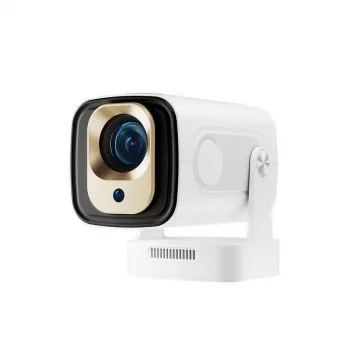
- 1080P Full HD Auto Focus Mini Projector with 4K Support and Android 11 — a compact all-in-one choice for quick focusing, portable placement, and built-in streaming.
- Elegant Structured Crocodile Pattern Leather Shoulder Bag – Soft Texture — a stylish option for carrying small accessories on the go (think cables, adapters, and travel essentials).
- Cute Apple House Kitten Plush – Soft Detachable Cat Plush Toy — a cozy add-on for relaxed movie nights, kids’ sleepovers, or a dorm lounge vibe.
FAQ
Does 4K support mean the projector displays true 4K resolution?
Usually not. “4K support” commonly means it can accept a 4K input signal, while the projector’s native display may still be 1080P; the advantage is better compatibility with modern devices and clean downscaling.
How does auto focus work on a mini projector?
Auto focus typically uses a sensor or camera to evaluate image sharpness and then adjusts the lens automatically, especially after you move the unit or change distance. For best results, aim at a uniform screen/wall, avoid extreme angles, and give it a few seconds to settle.
Can Android 11 projectors replace a streaming stick?
They can for many households, especially when your favorite apps run well on the built-in system. If you need the widest app support, stronger DRM compatibility, or more consistent updates, a dedicated streaming stick can still be the simplest solution.










Leave a comment